|
This tutorial reads like a good magazine
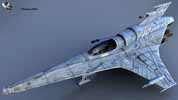
article/tutorial. The surfacing of the MK7
(pictured above) is discussed in a fairly straight
forward manor but introduces some nice techniques
along the way. Let me make this very clear
right now though - this tutorial is not meant for
beginners. The style of the tutorial is such
that it talks about the techniques but does not
illustrate LightWave panels along the way.
Fabio, the author, is speaking to other
professionals, people who already know the
lightwave interface very well and have a good
understanding of the basics of applying textures
to a LightWave model. Fabio teaches you the
technique with images of the MK7 as he progresses
through the various stages
of development from a basic surface assignment to
the finished render. This tutorial teaches techniques
that
every texture artist should get to know.
The tutorial starts out with a good run-through
of creating a grey scale image map in Photoshop
and then continues with applying various maps and
procedural textures to the surface of the
LightWave model. From this point each step
of the texturing on the MK7 is outlined. You
will have to find your own model to practice on
though because the MK7's mesh is not included with
the tutorial (the MK7 model is not licensed for
public consumption) which may make it more
difficult to follow along with. This tutorial would have been better if a model
of the object referenced in the tutorial was
included.
Along with this tutorial, all the other free
tutorials on the Meshweaver site are included on
the CD as well. You can also purchase this
tutorial as part of a collection of nurnies.
Whats a nurnie? Well check out the catalogue
and you will see what I mean. Basically a
nurnie is a "thing" to add detail to a
model. Especially useful for space ships but
certainly not limited to anything other than
imagination. This is not a review of the
nurnie's collection but they do look cool. Overall
I liked the tutorial but I think that it should
have included the model for the student to
practice on and more detailed images of the
LightWave texturing panels for people less
experienced with the LightWave interface.
The tutorial is not geared to beginners but the
techniques taught are very valuable so I think it
would be much better to have it appeal to a
greater range of LightWave user levels. It
think that the price may be a little high in
comparison to what you get with some other
tutorials but I think that if you combine this
with the Nurnies Collection you will get your
monies worth. It would be nice if Fabio
would offer the tutorial as an internet download
for less money.
|