|
This tutorial is a set
of three videos that is aimed at the LightWave
beginner/novice. The videos total in length
to just under two hours and teach some of the
basics of modelling. The videos cover the
tools and techniques that every novice LightWave
user should learn.
The videos are
clear and the sound is clean and, at least on my
system, sync up well with the video. If you
use the supplied Camtasia player to view the
videos you will be able to easily scrub through
the videos making it easy to backtrack to a
section and replay it (if you are modelling along
with the video) and also easy to fast forward to a
section on the video that you may have left off
at.
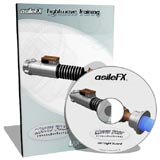
This tutorial has
you model the light sword as pictured on the box
(see above) using a variety of tools and
techniques. You also apply very basic
textures to the model. The modelling
instruction is definitely geared to the LightWave
novice and the author (Nicholas) does a good job
of describing which tools he is using and which
keyboard shortcut will activate those tools.
Pay attention to the keyboard shortcuts he
describes because the author does not use the
buttons on the LightWave interface menus to pick
his tools. The modelled sword looks exactly
like the one on the box cover so what you see is
what you get.
I would have liked
to see a video on more intricate texturing
techniques and perhaps a quick video on how to
render an image of the sword but this isn't the
main focus of this tutorial so all you really get
is the modelling instruction.
|